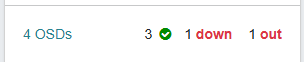
kubernetes node upgrade등의 진행시 Ceph status에서 알람이 확인 되는 경우가 있습니다.
해당 현상 확인 및 처리 방법에 대한 정리내용 입니다.
work node 1번을 drain 시킨 후 확인된 알림
# ceph 상태 확인
test@test-master-01:~$ kubectl -n rook-ceph exec -it deploy/rook-ceph-tools -- ceph status
  cluster:
    id:     d874b4ea-8deb-4aa3-a3ac-e750180a6a5b
    health: HEALTH_WARN
            4 mgr modules have recently crashed

  services:
    mon: 3 daemons, quorum a,b,c (age 10h)
    mgr: b(active, since 5M), standbys: a
    mds: 1/1 daemons up, 1 hot standby
    osd: 3 osds: 3 up (since 10h), 3 in (since 18M)

  data:
    volumes: 1/1 healthy
    pools:   5 pools, 113 pgs
    objects: 20.17k objects, 882 MiB
    usage:   7.6 GiB used, 82 GiB / 90 GiB avail
    pgs:     113 active+clean

  io:
    client:   852 B/s rd, 2 op/s rd, 0 op/s wr

# ceph pod 상태 확인
test@test-master-01:~$ kubectl -n rook-ceph get pod -o wide | egrep 'mgr|mds|mon|osd'
rook-ceph-mds-myfs-a-77d484dc4-jddf9 2/2 Running 4 537d 172.16.118.75 test-worker-02 <none> <none>
rook-ceph-mds-myfs-b-bd6ddc59b-l2b4t 2/2 Running 4 537d 172.16.118.72 test-worker-02 <none> <none>
rook-ceph-mgr-a-7595f6b7d8-v2ww6 3/3 Running 8 546d 172.16.7.148 test-worker-03 <none> <none>
rook-ceph-mgr-b-7cdf75cdb6-bmmgq 3/3 Running 0 171d 172.16.36.215 test-worker-01 <none> <none>
rook-ceph-mon-a-54db4674f4-9z847 2/2 Running 6 546d 172.16.118.101 test-worker-02 <none> <none>
rook-ceph-mon-b-54788d658b-wd658 2/2 Running 4 546d 172.16.36.230 test-worker-01 <none> <none>
rook-ceph-mon-c-84f87b7c5-9z6ck 2/2 Running 4 546d 172.16.7.153 test-worker-03 <none> <none>
rook-ceph-osd-0-788c4889ff-5gvcm 2/2 Running 0 171d 172.16.36.226 test-worker-01 <none> <none>
rook-ceph-osd-1-7795c9dc4c-hzvqv 2/2 Running 0 171d 172.16.118.106 test-worker-02 <none> <none>
rook-ceph-osd-2-6db8dc77dc-f8ct9 2/2 Running 0 171d 172.16.7.160 test-worker-03 <none> <none>
rook-ceph-osd-prepare-test-worker-01-hldb7 0/1 Completed 0 314d <none> test-worker-01 <none> <none>
rook-ceph-osd-prepare-test-worker-02-wv5rc 0/1 Completed 0 314d 172.16.118.84 test-worker-02 <none> <none>
rook-ceph-osd-prepare-test-worker-03-pbnbb 0/1 Completed 0 314d 172.16.7.172 test-worker-03 <none> <none>

# MDS pod node 위치 확인
test@test-master-01:~$ kubectl -n rook-ceph get pod -o wide | egrep 'mds'
rook-ceph-mds-myfs-a-77d484dc4-jddf9                      2/2     Running     0                18s    172.16.118.75    test-worker-02   <none>           <none>
rook-ceph-mds-myfs-b-bd6ddc59b-l2b4t                      2/2     Running     0                18s    172.16.118.72    test-worker-02   <none>           <none>

# cephFS 상태 확인
test@test-master-01:~$ kubectl -n rook-ceph exec -it deploy/rook-ceph-tools -- ceph fs status
myfs - 2 clients
====
RANK      STATE        MDS       ACTIVITY     DNS    INOS   DIRS   CAPS
 0        active      myfs-b  Reqs:    0 /s  35.9k  18.0k  4301      2
0-s   standby-replay  myfs-a  Evts:    0 /s  35.9k  18.0k  4301      0
      POOL         TYPE     USED  AVAIL
 myfs-metadata   metadata   629M  25.8G
myfs-replicated    data    12.0k  25.8G
   myfs-data0      data     982M  25.8G
MDS version: ceph version 18.2.2 (531c0d11a1c5d39fbfe6aa8a521f023abf3bf3e2) reef (stable)
2개의 MDS pod가 기동중이며 active 상태이지만 2개 모두 woker node 2번에 집중되어 기동되고 있는 상태 입니다.
cephFS 서비스는 현재 이상이 없지만 향후 서비스 성능 리스크가 있을 것으로 예상 되므로 pod Anti-affinity 를 구성하여 MDS pod가 하나의 work node에 집중되는 것을 방지하도록 하겠습니다.
# pod Anti-affinity 반영
test@test-master-01:~$ kubectl -n rook-ceph patch cephfilesystem myfs --type='merge' -p '
> spec:
  metadataServer:
    placement:
      podAntiAffinity:
        requiredDuringSchedulingIgnoredDuringExecution:
        - labelSelector:
            matchExpressions:
            - key: app
              operator: In
              values: ["rook-ceph-mds"]
            - key: rook_file_system
              operator: In
              values: ["myfs"]
          topologyKey: kubernetes.io/hostname
'
cephfilesystem.ceph.rook.io/myfs patched

# 적용 확인
test@test-master-01:~$ kubectl -n rook-ceph get cephfilesystem myfs -o yaml | sed -n '1,260p'
apiVersion: ceph.rook.io/v1
kind: CephFilesystem
metadata:
  annotations:
    kubectl.kubernetes.io/last-applied-configuration: |
      {"apiVersion":"ceph.rook.io/v1","kind":"CephFilesystem","metadata":{"annotations":{},"name":"myfs","namespace":"rook-ceph"},"spec":{"dataPools":[{"replicated":{"size":3}}],"metadataPool":{"replicated":{"size":3}},"metadataServer":{"activeCount":1,"activeStandby":true},"preserveFilesystemOnDelete":true}}
  creationTimestamp: "2024-07-07T15:23:38Z"
  finalizers:
  - cephfilesystem.ceph.rook.io
  generation: 3
  name: myfs
  namespace: rook-ceph
  resourceVersion: "115648910"
  uid: 92cd0904-f6e1-4b15-853d-165b87be04d5
spec:
  dataPools:
  - application: ""
    erasureCoded:
      codingChunks: 0
      dataChunks: 0
    mirroring: {}
    quotas: {}
    replicated:
      size: 3
    statusCheck:
      mirror: {}
  metadataPool:
    application: ""
    erasureCoded:
      codingChunks: 0
      dataChunks: 0
    mirroring: {}
    quotas: {}
    replicated:
      size: 3
    statusCheck:
      mirror: {}
  metadataServer:
    activeCount: 1
    activeStandby: true
    placement:
      podAntiAffinity:
        requiredDuringSchedulingIgnoredDuringExecution:
        - labelSelector:
            matchExpressions:
            - key: app
              operator: In
              values:
              - rook-ceph-mds
            - key: rook_file_system
              operator: In
              values:
              - myfs
          topologyKey: kubernetes.io/hostname
    resources: {}
  preserveFilesystemOnDelete: true
  statusCheck:
    mirror: {}
status:
  observedGeneration: 2
  phase: Ready

# worker node 1번 uncordon 후 worker node 2번을 drain 처리시 MDS pod 위치 worker node 1, 3번 확인
test@test-master-01:~$ kubectl -n rook-ceph get pod -o wide | egrep 'mds'
rook-ceph-mds-myfs-a-58846844d6-nd5mk                     2/2     Running     0             53s     172.16.36.216    test-worker-01   <none>           <none>
rook-ceph-mds-myfs-b-6b4d9476cb-q6b6p                     2/2     Running     0             38s     172.16.7.190     test-worker-03   <none>           <none>

# cephFS 상태 확인
test@test-master-01:~$ kubectl -n rook-ceph exec -it deploy/rook-ceph-tools -- ceph fs status
myfs - 2 clients
====
RANK      STATE        MDS       ACTIVITY     DNS    INOS   DIRS   CAPS
 0        active      myfs-a  Reqs:    0 /s  35.9k  18.0k  4301      2
0-s   standby-replay  myfs-b  Evts:    0 /s  35.9k  18.0k  4301      0
      POOL         TYPE     USED  AVAIL
 myfs-metadata   metadata   621M  25.8G
myfs-replicated    data    12.0k  25.8G
   myfs-data0      data     982M  25.8G
MDS version: ceph version 18.2.2 (531c0d11a1c5d39fbfe6aa8a521f023abf3bf3e2) reef (stable)
MDS pod의 위치는 의도대로 분산 deploy 되었지만 ceph status 에서는 여전히 HEALTH_WARN 상태 입니다.
해당 알람은 mgr pod event에 대한 내역으로 MDS 이슈 처리사항과는 무관하지만 event 확인 후 초기화 처리 하도록 하겠습니다.
mgr available status가 true 이면 상태는 정상입니다.
# ceph health의 mgr alarm 확인
test@test-master-01:~$ kubectl -n rook-ceph exec -it deploy/rook-ceph-tools -- ceph status
  cluster:
    id:     d874b4ea-8deb-4aa3-a3ac-e750180a6a5b
    health: HEALTH_WARN
            4 mgr modules have recently crashed

  services:
    mon: 3 daemons, quorum a,b,c (age 2m)
    mgr: b(active, since 10m), standbys: a
    mds: 1/1 daemons up, 1 hot standby
    osd: 3 osds: 3 up (since 110s), 3 in (since 18M)

  data:
    volumes: 1/1 healthy
    pools:   5 pools, 113 pgs
    objects: 20.17k objects, 881 MiB
    usage:   6.3 GiB used, 84 GiB / 90 GiB avail
    pgs:     113 active+clean

  io:
    client:   1.2 KiB/s rd, 2 op/s rd, 0 op/s wr

# mgr 상태 정상 확인
test@test-master-01:~$ kubectl -n rook-ceph exec -it deploy/rook-ceph-tools -- ceph mgr stat
{
    "epoch": 476,
    "available": true,
    "active_name": "b",
    "num_standby": 1
}

# mgr crash 목록 확인
test@test-master-01:~$ kubectl -n rook-ceph exec -it deploy/rook-ceph-tools -- ceph crash ls
ID                                                                ENTITY  NEW
2025-12-26T09:01:17.354121Z_c76c6eaf-4bf7-4cf9-a9ec-f646fe857b76  mgr.b    *
2025-12-26T09:01:32.345473Z_4dfd271c-3d5b-4c89-88cf-13ba096f327b  mgr.b    *
2025-12-26T09:01:47.357321Z_0f938fb6-4c50-4b58-815d-5990fbe4bbb7  mgr.b    *
2025-12-26T09:02:02.329492Z_43d344a7-b71f-442e-a664-1852dda3a3f3  mgr.b    *
test@test-master-01:~$ kubectl -n rook-ceph exec -it deploy/rook-ceph-tools -- ceph crash stat
4 crashes recorded

# mgr crash 이력 정리 후 health alarm 확인
test@test-master-01:~$ kubectl -n rook-ceph exec -it deploy/rook-ceph-tools -- ceph crash archive-all
test@test-master-01:~$ kubectl -n rook-ceph exec -it deploy/rook-ceph-tools -- ceph status
  cluster:
    id:     d874b4ea-8deb-4aa3-a3ac-e750180a6a5b
    health: HEALTH_OK

  services:
    mon: 3 daemons, quorum a,b,c (age 6m)
    mgr: b(active, since 14m), standbys: a
    mds: 1/1 daemons up, 1 hot standby
    osd: 3 osds: 3 up (since 5m), 3 in (since 18M)

  data:
    volumes: 1/1 healthy
    pools:   5 pools, 113 pgs
    objects: 20.17k objects, 881 MiB
    usage:   6.3 GiB used, 84 GiB / 90 GiB avail
    pgs:     113 active+clean

  io:
    client:   922 B/s rd, 1 op/s rd, 0 op/s wr
추가로 node drain, uncordon 등의 action 시 rebalancing 이 발생할 수 있으나 일정 시간 후에 재확인 하시면 HEALTH_OK 상태로 변경 확인할 수 있습니다.
test@test-master-01:~$ kubectl -n rook-ceph exec -it deploy/rook-ceph-tools -- ceph status
  cluster:
    id:     d874b4ea-8deb-4aa3-a3ac-e750180a6a5b
    health: HEALTH_WARN
            1/3 mons down, quorum a,c
            4 mgr modules have recently crashed

  services:
    mon: 3 daemons, quorum a,c (age 0.275988s), out of quorum: b
    mgr: b(active, since 7m), standbys: a
    mds: 1/1 daemons up, 1 hot standby
    osd: 3 osds: 3 up (since 8m), 3 in (since 18M)

  data:
    volumes: 1/1 healthy
    pools:   5 pools, 113 pgs
    objects: 20.17k objects, 881 MiB
    usage:   6.3 GiB used, 84 GiB / 90 GiB avail
    pgs:     113 active+clean

  io:
    client:   852 B/s rd, 1 op/s rd, 0 op/s wr