카테고리 보관물:  IT

아파치 https 구성

아파치 https 구성을 위한 mod ssl 모듈 설치 및 openssl 키구성 과정 예시 입니다.

※ CentOS 6.x 기준으로 작성 되었던 내용입니다. 그리고 아파치를 컴파일로 설치했을 경우 mod_ssl도 다시 컴파일로 설치를 진행해야 합니다.

  • mod_ssl, openssl 선설치
// 설치 여부 확인
# rpm -qa | grep -E "mod_ssl|openssl"

# yum install mod_ssl openssl -y
  • self-signed certificate 생성
// 개인키 생성
# openssl genrsa -out ca.key 1024

// CSR(Certificate Signing Request) 생성
# openssl req -new -key ca.key -out ca.csr
// 국가/주(도)/시/사명//domain(hostname)/// 영문으로 각 순서에 입력

// Self Signed Key 생성
# openssl x509 -req -days 3650 -in ca.csr -signkey ca.key -out ca.crt

// 생성키 복사 처리
# cp ca.crt /etc/pki/tls/certs/
# cp ca.key /etc/pki/tls/private/ca.key
# cp ca.csr /etc/pki/tls/private/ca.csr

※ selinux 인해 삭제시 복구
# restorecon -RvF /etc/pki
  • ssl용 config 수정
# /etc/httpd/conf.d/ssl.conf 수정
#경로 및 파일명 수정
SSLCertificateFile /etc/pki/tls/certs/ca.crt
SSLCertificateKeyFile /etc/pki/tls/private/ca.key
  • httpd config 수정
# /etc/httpd/conf/httpd.conf에 추가
NameVirtualHost *:443 #2.4버전에서는 삭제
<VirtualHost *:443>
  SSLEngine on
  SSLCertificateFile /etc/pki/tls/certs/ca.crt
  SSLCertificateKeyFile /etc/pki/tls/private/ca.key
  ServerAdmin hello.co.kr #인증서 생성 과정에서 설정해준 사용자명 혹은 서버 호스트명은 이곳에 똑같이 적어준다
  DocumentRoot /var/www/html
  ServerName hello.co.kr #인증서 생성 과정에서 설정해준 사용자명 혹은 서버 호스트명은 이곳에 똑같이 적어준다
  ErrorLog logs/ssl_starkapin_com_error_log
  CustomLog logs/ssl_starkapin_com_error_log common
</VirtualHost>

# 페이지 리다이렉트
# mod_rewirte 모듈 활성화 필요
# /etc/httpd/conf/httpd.conf 수정
<VirtualHost *:80>
  RewriteEngine On
  RewriteCond %{HTTPS} !=on
  RewriteRule ^/?(.*) https://%{SERVER_NAME}/$1 [R,L]
</VirtualHost>
  • 서비스 재시작
// CentOS 6.x
# service httpd restart

// CentOS 7.x
#systemctl restart httpd
  • 정상 구동 확인
// 80, 443포트 리슨 확인
# netstat -ntlp

// 브라우저 통해 실제 http 접속후 https로 리다이렉션 여부 확인
Apache Upgrade(2.2 -> 2.4)

아파치 2.2에서 2.4로 업그레이드 되면서 일부 설정 파일의 변화가 있었습니다. 내용을 간략히 정리해 보았습니다.

기존 2.2 설정을 유지한 상태로 서비스를 기동하게 되면 서비스 기동이 실패할 확률이 높으므로 설정 파일에 대한 검토가 선행 되어야 합니다.

주요 설정 차이는 아래와 같습니다.

Version2.2
PolicyOrder allow,denyAllow from all
VhostsNameVirtualHost *:80

<VirtualHost *:80>
    DocumentRoot “D:\webapp\testlocalhost”
    ServerName testlocalhost
    ServerAlias testlocalhost
    ErrorLog “logs/testlocalhost -error.log”
    CustomLog “logs/testlocalhost -access.log” common
</VirtualHost>
cgid_modulesLoadModule cgid_module modules/mod_cgid.so
on httpd.conf
Version2.4
PolicyRequire all granted
Vhosts<VirtualHost testlocalhost:80>
    DocumentRoot “D:\webapp\testlocalhost”
    ServerName testlocalhost
    ErrorLog “logs/testlocalhost -error.log”
    CustomLog “logs/testlocalhost -access.log” common
</VirtualHost>
cgid_modules주석처리
on httpd.conf
refer(예시)
DocumentRoot /some/local/dir

<Directory /some/local/dir/>
   <RequireAll>
      Require all granted
      Include conf/IPList.conf
   </RequireAll>
</Directory>

#this will also work
<Location />
   <RequireAll>
      Require all granted
      Include conf/IPList.conf
   </RequireAll>
</Directory>
And inside conf/IPList.conf, you will have individual lines with entries like the following
conf/IPList.conf에 아래와 같이 개별 접근 제어할 IP 리스트를 파일로 보관할 수 있으며 2.2의 Allow 대신 Require를 사용하게 되었습니다.

Require not ip 10.10.1.23
Require not ip 192.168.22.199
Require not ip 10.20.70.100

그 외의 기능은 아래 출처를 통해 추가로 확인할 수 있습니다.

출처> http://httpd.apache.org/docs/trunk/upgrading.html

웹 취약점 보완 기본 I

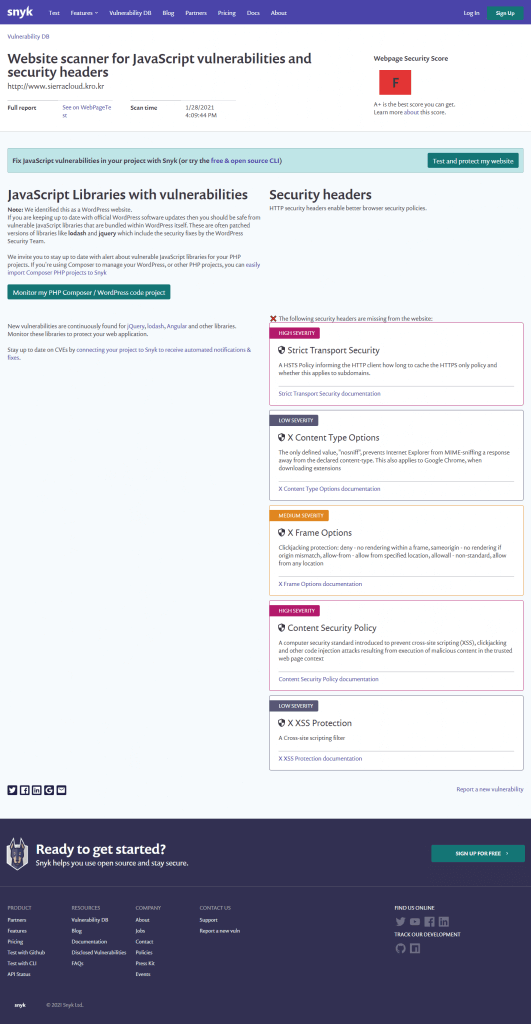
  1. 아파치 설치 후 기본적인 SSL 설정만 적용한 상태에서 webpage test를 진행해 보았습니다.
F Score에 좌절할 필요 없이 다음 단계로….

2. 신속히 httpd.conf가 있는 곳으로 가서 다음 설정을 입력해 줍니다…

# HSTS(Strict Transport Security) Config
Header always set Strict-Transport-Security "max-age=31536000; includeSubDomains; preload"

# X Frame Options Config
Header always set X-Frame-Options "SAMEORIGIN"

# X Content Type Options Config
Header always set X-Content-Type-Options nosniff

# X XSS Protection Config
Header always set X-XSS-Protection "1; mode=block"

3. 이제 아파치를 재시작 한 후 다시 테스트를 진행해 봅니다…

Strict Transport Security
X Content Type Options
X Frame Options
X XSS Protection
해결…
A Score….

※ Content Security Policy 부분이 남아 있지만 이부분은 적용시 실제 서비스에 영향을 크게 끼치므로 코드와 도메인 부분의 검토가 필요합니다.

내용을 준비해서 이후에 별도로 다뤄보도록 하겠습니다…